Buying Guide for the Best Under Desk Keyboard Tray
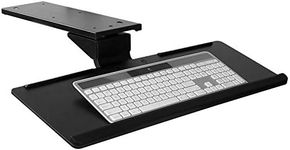
Choosing the right under-desk keyboard tray can make a big difference in your comfort and productivity, especially if you spend long hours at your desk. The main goal is to find a tray that fits your workspace, supports good posture, and matches your typing habits. Before you buy, think about your desk size, how much space you need for your keyboard and mouse, and whether you want extra features like adjustability or wrist support. A well-chosen tray can help reduce strain on your wrists, shoulders, and back, making your work setup much more ergonomic.Tray SizeTray size refers to the overall dimensions of the keyboard tray, including its width and depth. This is important because it determines whether your keyboard and mouse will fit comfortably on the tray. Smaller trays are suitable for compact keyboards or limited desk space, while larger trays can accommodate full-sized keyboards and a mouse side by side. To pick the right size, measure your keyboard and mouse together and compare it to the tray's dimensions, making sure there's enough room for comfortable movement.
AdjustabilityAdjustability means how much you can change the height, tilt, and sometimes the side-to-side position of the tray. This is crucial for achieving a comfortable typing position and reducing strain. Some trays offer only basic height adjustment, while others allow you to tilt the tray or move it left and right. If you want to fine-tune your setup for ergonomics, look for a tray with multiple adjustment options. If you just need a simple solution, a fixed or minimally adjustable tray may be enough.
Mounting MechanismThe mounting mechanism is how the tray attaches to your desk. Some trays use clamps that don't require drilling, while others need to be screwed into the underside of your desk. Clamp-on trays are easier to install and remove, making them ideal for temporary setups or if you can't modify your desk. Screw-in trays are more stable and secure, which is better for permanent setups. Consider your desk's thickness and material, as well as whether you're allowed to make permanent changes, when choosing the mounting type.
Weight CapacityWeight capacity is the maximum amount of weight the tray can safely support. This matters if you have a heavy keyboard, use additional accessories, or tend to rest your arms on the tray. Lighter trays are fine for standard keyboards, but if you use a mechanical keyboard or keep other items on the tray, look for a higher weight capacity. Always check the manufacturer's recommendations to ensure the tray will hold up to your daily use.
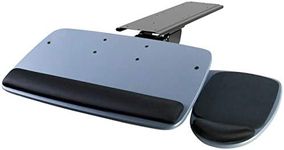
Wrist SupportWrist support refers to built-in padding or a raised area at the front of the tray designed to support your wrists while typing. This can help reduce fatigue and prevent discomfort during long typing sessions. Some trays come with soft wrist rests, while others have a hard edge or no support at all. If you often experience wrist pain or want extra comfort, choose a tray with a cushioned wrist rest. If you prefer a minimalist setup or already use a separate wrist rest, this feature may be less important.
Slide and Swivel FunctionSlide and swivel function describes whether the tray can be pushed under the desk when not in use and if it can rotate left or right. This is useful for saving space and adjusting the tray's position for comfort. Trays that slide fully under the desk are great for keeping your workspace tidy, while swivel features let you angle the tray for easier access. If you need to frequently move your tray out of the way or want more flexibility, look for these features.